Sunday, June 30, 2024

Automation Script as a Cron task

Automation Script can be used to create crontask without any Java customization file.
 
It's widely used option to avoid outage using Java Code for Cron task.

Cron task definition for an automation script has a Class file value and 2 parameters.
 
Class file value should be set to com.ibm.tivoli.maximo.script.ScriptCrontask

Cron task instance parameters: 
SCRIPTNAME - Name of the automation script without launch point
SCRIPTARG - Arguments to pass values to the Script
{"siteid": "BEDFORD","status": "'WAPPR','APPR','WMATL'"}


Automation Script - C_ASCRONTASK 
Script Name should be set as SCRIPTNAME parameter in Cron task
if arg is not None:
   args = service.tojsonobject(arg)
   
   assetSite = args.get('siteid')
   assetValidStatus = args.get('status')
   
   #service implicit variable is used to getMboSet since 7.6.1.2 . MXServer is not needed
   #runAsUserInfo is the userInfo of Cron task Instance
   assetSet = service.getMboSet("ASSET", runAsUserInfo)
   assetSet.setWhere("siteid='" + assetSite + "' and status in (" + assetValidStatus + ")" )
   assetSet.reset()
   
   assetMbo = assetSet.moveFirst()
   while (assetMbo): 
        # more logic 
	assetMbo = assetSet.moveNext()
   assetSet.save()
   assetSet.close()


Friday, May 31, 2024

Comparison of Maximo 7.6.x vs MAS 8.x for MAS Upgrade

As IBM planned to discontinue the regular base support for Maximo 7.6.1.x version on Sep'2025, clients are analyzing the impact on their existing Infrastructure and Systems. It's useful to know the basic difference between the versions for preparing for MAS Upgrade.

           Items
   Maximo 7.6.1.x
                MAS 8.x
Application Server
Websphere
WAS Liberty
Database
Normal JDBC configuration connected via client VPN
Hosted from IBM Cloud
Connection possible via SSL certification only
Server Folder/Logs
Server File path can be accessed using WinScp or putty tool and download the log file
Connection with accesskey & secretkey for Cloud Object Storage (like AWS Bucket).
Mobile Solutions
Maximo Anywhere and Work Centers

SSO not available in OOB Maximo Anywhere
Maximo Anywhere & Work Centers will be deprecated from 8.9 version.
 
SSO supported in Maximo Mobile Out of Box. 

Adoption to Maximo Mobile with MAS demands some effort for clients.
Hyper scalers
Can be hosted from Cloud Servers like EC2
Available in Amazon and Azure Marketplace with instructions.

Clients need resource with skillset of managing the infrastructure
Inspections Form and Conducting Inspections
Work Centers
Maximo Mobile
UI theme
          N/A
Old Maximo theme can’t be retained
Users
Users & Person applications
Users & person application with MAS Administration application.

MAXUSERSYNC will create users from MAXUSER table to Administration application
Self Service Portal (SSP)
SSP devops portal can be used for running configdb, restart servers, running sql etc.,
If we use IBM Cloud, then IBM SRE team will perform the activity by a case from client. 

If we use Azure/AWS Cloud, we can perform such actions on our own.
Messaging engine
JMS and Kafka providers are supported.

JMS queues are hosted in same Application server
JMS and Kafka providers are supported

JMS queues are hosted from a different server using a new bundle standalonejms to isolate the functionality.

A set of OOB kafka cron tasks to be enabled for MAS
UI Difference
           N/A
-> Save button is at right hand side in all application and it’s not easy to use

-> Buttons around the tables are different after Upgrade
MongoDB
           N/A
Used for data dictionary (like install.properties information and user management)
Production Database
Read access is given by default
Read access is given only if you buy a secondary database                                      
Customization
Java files are placed with proper folder structure, build EAR and deploy into Application Server.
Development is same, but deployment process is different. 

We need to create a zip file and upload it to MAS.                        
Reports
Barcode in BIRT Reports needs customization

Oracle Compatible SQLs (such as rownum, connect by prior) are allowed in DB2
Barcodes are supported in OOB BIRT Configuration


Oracle Compatible SQLs are disabled in DB2. We need to use an alternative sql in DB relationships and reports. Replacing "connect by prior" vs "with clause"                          
Authentication
MAXAUTH or API Key authentication are used.


API Key is added to a User using Work Center -> Administration -> Integration -> API Keys tab
From MAS 8.8 or higher, Maximo Manage supports only API key-based authentication for integration with external applications and REST API transactions. 

For integration, XML along with SOAP and HTTP protocols use API keys.
 
The existing REST APIs (maxrest or rest) and new REST APIs from MAS (oslc) support API keys.  

API Keys Application is used to add key for User                      

References:

Tuesday, April 30, 2024

Maximo Mock Service for Integrations based on JMS

A sample Java based mock service for Maximo JMS Integrations to mock a PR Interface response from an external system. Code - gitlab-suren-jmsmockservice 

Mock Services are used to simulate the client calls, receives requests or returns responses for Integrations in environments other than production. 

It's used to create testing scenarios before the implementation of actual Interface, regression testing, cost effective availability of integration for non-production environments and create client demos.

This tool will receive the message from request queue, validate the message for mandatory fields, process the message to find the folder and prepare the response file and return it to response queue


The utility should be started as a service on the server from a command line from the com.custom.mockrunner.Driver class with Command line arguments. 


The Command Line must pass these Environment, Interface (or Service) and resource file path as arguments to establish connection to a JMS Bus, Interface to identify the response template and resource path to location of properties and response template folder. 


-e Environment argument denotes the system to which the tool needs to establish connection. It must match with the properties file (local, test etc.,) which has the JMS Connection properties like SIBus (Service Integration Bus) Provider URL, JNDI Factory and JMS Binding Names. It also has queue names of the JMS for reading the messages.

-s Service argument specifies the Interface name used in the MockFactory class to instance the particular JMSMock Class. 

-f Resource Path folder location where connection details and template files are placed.

Command Line statement to execute the Java Program
Driver -etest -sgetPR -f"/resources/"

Based on the (-s) service argument, the MockRunner interface (super class) will create object from its subclass JMSMockForGetPRResponse. It uses Factory Method design pattern to initiate objects based on any services in future.

JMSMockForGetPRResponse implements javax.jms.MessageListenser to read the message from PR_RequestQueue, find the folder/file to send the response back to PR_ResponseQueue. 


Pros:
  • Gives an option to test integrations in lower environment
  • Custom framework won't require any licensing cost like other Products like SOAPUI Pro
Cons: 
  • Needs Java Knowledge resource to maintain the mock service, instead an open source mock service providers like ActiveMQ can be used for easy of maintenance

Sunday, March 10, 2024

Set Label Names Dynamically in Maximo

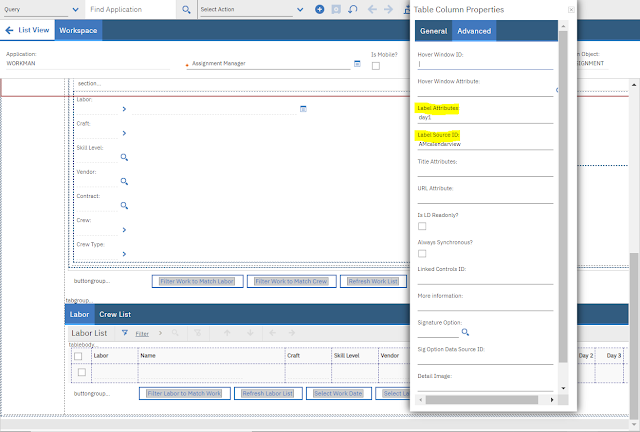
Set Label Names dynamically in Maximo fields, section/section header or table column/header.

A few scenarios like displaying costs for decommissioned/not ready assets, Hazards and Precautions information for Work Order and Date table column in Assignment Manager application requires labels to have dynamic values to make relevance for current record.

Dynamic Label Names can be set in following places:
  • Field Name based on a sigoption condition by a property label
  • Section or Section Header Name using parameter values
  • Table column label using "Label Source ID" and "Label Attributes"
Field Name change by label property using sigoption condition

In WO application, we have configured "WOPRIORITY" field name based on the work type value condition. If it is PM based WO, then set the label as "PM Priority" else "WO Priority". 


Section Header or Table Control Name using parameter values
We can set a section header with a dynamic label using parameter value properties.

Parameter Values Control  <paramvalues> - contains a list of parameter values with positions that can be replaced with values in label of Section Header

Parameter Value <paramvalue> control defines the datasrc and dataattribute with position for label property. 

datasrc - you can set any datasource that is different than parent control i.e., table or section. If you don't set any datasource, then it inherits the parent's data source. If parent dont have a data source or parent is application, then primary data source of the application MAINRECORD will be taken

dataattribute - based on the datasource we can use an attribute name or any related record. 

position - the number in position will replace the label text in the sectionheader


Table Column - Label Source ID and Label Attributes:

We can dynamically set value for a table column using label source ID and Label attribute tags in table column properties. 

In Assignment Manager application (WORKMAN.xml), Maximo has defined a datasource on CALENDARVIEW mbo which is used for referencing the label source ID and label attributes. 

<datasrc id="AMcalendarview" mboname="calendarview"/>

<tablecol 
classname="rowbg_gray" dataattribute="labor.day1" filterable="false"  id="select_labor_col_7" label="{0}" labelattributes="day1" labelsrcid="AMcalendarview"    mxevent="assignlabgrid" sortable="false" targetid="select_labor_col_7" type="event"/>


References:

Wednesday, February 14, 2024

Maximo Average Calculation Methods for Continuous Meter readings

Continuous Meters for Locations or Assets will have an Average Calculation Method specified for calculating the Average Units per day value. Gauge and Characteristic type meters do not have Average calculation method.

Continuous Meters are used to measure consumption or cumulative values. These meters record items like mileage, hours worked, fuel usage or number of items produced. Reading type can be Actual (cumulative) or Delta (incremental). New reading value must be greater than or equal to last reading. 

Maximo calculates the daily Average based on the meter readings and average calculation method, There are four types of Average Calculation Methods available: ALL, SLIDING-DAYS,SLIDING-READINGS,STATIC.

ALL 
Daily Average is calculated based on all meter readings recorded so far for the meter

Average = (Sum of all delta readings  -  Delta reading of earliest date)  /

                           ( Last reading date – Earliest reading date)

Let us find the Average for ALL calculation type:

Current Date Time - 10-Feb-2024 18:00:00 

Average Units per day 
= Sum of all delta readings  -  Delta reading of Earliest Date (31-Jan-2024)   /
   Last reading date(10-Feb-2024 7:00:07) - Earliest Meter reading date(31-Jan-2024 7:00:07)
= (80+70+50+65+60+70+55+75+65+70+80)  - 80  / 10
= 660 / 10 = 66  

SLIDING-DAYS 
Daily Average is calculated based on last N days of meter readings. 
N - SLIDING Window Size

It's used for scenarios where the complete set of odometer readings doesn't make any relevance than taking the last 180/365 days of readings to know the exact overhaul or maintenance requirement.

Average = 

(Sum of all delta readings for Sliding days range - Delta reading of earliest date)  /

( Last reading Date – Earliest reading date from meter readings Set )

Let us find the Average for 10 Sliding Days:


Current Date Time - 10-Feb-2024 18:00:00 
Sliding Date Range starts from = Current Date Time - 10 Days = 31-Jan-202418:00
Meter Readings Range starts from values greater than 31-Jan-2024 18:00  
Earliest Meter Reading Date = 01-Feb-2021 7:00:07 ( from image list )

Average Units per day 
= Sum of all delta readings from 01-Feb-2024 to 10-Feb-2024  -  Delta reading of Earliest Date (01-Feb-2024)   /
   Last reading date (10-Feb-2024 7:00:07) - Earliest Meter reading date (1-Feb-2024 7:00:07)
= (80+70+50+65+60+70+55+75+65+70)  - 70  / 9
= 590 / 9 = 65.55  

SLIDING-READINGS 
Daily Average is calculated based on last N number of meter readings. 
N - SLIDING Window Size

Average = 

Sum of all delta readings for N sliding readings - Delta reading of earliest date  /

 ( Last reading Date – Earliest reading date from meter readings Set )

Let us find the Average for 5 Sliding readings.


Average Units per day 
Sum of all readings from 06-Feb-2024 to 10-Feb-2024  -  Reading of Earliest Date (06-Feb-2024)   /
Last reading date (10-Feb-2024 7:00:07) - Earliest Meter reading date (6-Feb-2024 7:00:07)
= (80+70+50+65+60)  - 60  / 5
= 265 / 5 = 53

STATIC
User need to manually enter a static value for Average Units/day field

References:

Friday, January 19, 2024

Maximo Outbound Object Structure Integration Customization Functions in Automation Script

Maximo Integration Framework supports customization of Object Structure in Java, Automation Script or both at the same time.

Object Structure processing can be Outbound or Inbound:
  • Outbound Object Structure custom processing can be performed during the serialization of Maximo business object (MBO) data into a json or XML message
  • Inbound Object Structure custom processing will happen in inbound json or XML message before it is mapped to MBO business object data
What? Outbound Object Structure processing functions using Automation Script

Why? Java Customizations for Integration processing needs an outage for deployment. Using Automation Script is more like a configuration and doesn't need any deployment or restart for a change.

Conditional Skipping (or excluding) columns and Overriding field values from other MBOs can't be achieved using processing rule configuration. 

How to Implement? Create an Outbound Object Structure processing script by selecting Create Integration Scripts from the Automation Scripting application. Choose any Object structure name - MXPR and select Outbound Definition check box.
 
Maximo will create a script with name OSOUT.<ObjectStructureName> and call the methods while processing Object Structure outbound operation.


from psdi.util import HTML

def overrideValues (ctx):
    if ctx.getMboName() == "PR" or ctx.getMboName() == "PRLINE":
        # remove html tags from pr and prline description
        ctx.overrideCol("DESCRIPTION_LONGDESCRIPTION", 
			HTML.toPlainText(ctx.getMbo().getString("DESCRIPTION_LONGDESCRIPTION")))
		
def skipCols(ctx):
  if ctx.getMboName()=='PRLINE':
    # remove extra fields from outbound message to reduce payload size
    ctx.skipCol(['RL1','RL2','RL3','RL4'])
	
def skipMbo(ctx):
  if ctx.getMboName()=='PR':
    if ctx.getMbo().getMboSet("PRLINE").isEmpty():
      ctx.skipTxn()
  elif ctx.getMboName()=='PR':
    # skip MBOs that are COMP or in history status
    if ctx.getMbo().getInternalStatus() == "COMP" or ctx.getMbo().getBoolean("HISTORYFLAG") :
      ctx.skipMbo()  

References: 

Thursday, December 21, 2023

Maximo Filter data using LOOKUPS whereclause tag

What ? Apply filter/whereclause on lookup values 

Why ? Easier to apply a condition on a list of values without a table domain
Some Maximo fields like WORKORDER.WORKTYPE have a field level class and adding a table domain would add more complexity for applying a list where condition. Instead a custom lookups.xml configuration in application designer is simple approach to achieve it.

How ?  Sample use case: Display items in Work Order plans tab that are in ACTIVE status or PENDOBS (Pending Obsolesce)  status having current balance greater than zero.

Follow the below steps to filter values from a lookup
  • Export the LOOKUPS.xml from Application Designer
  • Open the xml file and add/modify new table section
  • Add whereclause attribute on the table tag
<table id="activeitem" inputmode="readonly" selectmode="single" 
whereclause="status='ACTIVE' or (status='PENDOBS' and exists (select 1 from inventory a, invbalances b 
       where a.itemnum = item.itemnum and a.itemsetid = item.itemsetid and a.itemsetid = b.itemsetid and a.location = b.location 
   and a.itemnum = b.itemnum and a.siteid = b.siteid and b.curbal &gt; 0 and a.status in ( 'ACTIVE', 'PENDOBS')))">

  • We can't use greater than and lesser than symbol directly in the lookup.xml, so replace them with equivalent characters.
         greater than  (>) -->  &gt;      lesser than (<) -->  &lt;
  • Condition in whereclause runs from Item table, so use item.itemnum inside the subquery
  • Import the LOOKUPS.xml

  • Link the custom lookup "activeitem" to the WOTRACK.xml application on the ITEM field under the Planned Materials section 

References :  limiting-lookups-using-whereclause